Making AWS
Easier to
Operate
Build a consumer-grade operations experience across seven independently run AWS management services, so customers could start from what they wanted to do without first learning each service.
Seven product teams had to redirect resources from their own roadmaps, and the vision shipped in stages over three years instead of in one release.
Support tickets down 45% and CSAT up 120% versus the prior five years (2017–2022), and six AWS teams integrated their services into the shared experience.
The inflection point
Background & Context
AWS Management Tools had grown as a collection of independently developed services, each with its own team, roadmap, and technical model. Customers had to connect them into working environments themselves—learning the services, researching best practices, and configuring resources across accounts and Regions before they could begin operating effectively.
My remit covered the end-to-end experience across seven product areas. The challenge extended beyond individual interfaces: the customer journey depended on decisions made across more than 30 teams in nine organizational units, with existing commitments and competing priorities.
I saw an opportunity to build a consumer-grade experience on top of those powerful building blocks. Customers could start with what they wanted to accomplish, use recommended configurations to get running, and manage their resources through a connected experience. Making setup easier also had a commercial purpose: shortening the path to adoption and use of the underlying AWS services.
I originated and wrote the proposal that developed into the Systems Manager cockpit strategy: one place to group resources, view insights, and act. I then led the multidisciplinary team responsible for turning that direction into an experience we released incrementally over three years.
Can we reimagine enterprise software so that usability isn't an afterthought, but a strategic advantage that drives adoption and retention?
Chapter 01
Customers were connecting what we had built separately
The spaces between services
AWS had grown through powerful, independently developed services. Each team optimized its own product, with its own roadmap, technical model, and priorities.
Customers experienced the spaces between them. Setting up infrastructure, checking its configuration, investigating an incident, and resolving it could mean moving between multiple consoles, searching documentation, and piecing together the same context repeatedly.
The challenge was to make the portfolio work as a connected experience while preserving the flexibility that made the individual services valuable.
"It's somewhat shocking that every service team seems to be doing their own thing in terms of management of the console."
Customer feedback
This is Frustrating, I have more than 20 tabs open! AWS keeps shipping their organisational structure and we suffer”
IT operator in a financial institution
Most of the time I am not sure what I am doing. I am lost in the documentation. Why can't it be easier?”
IT admin in mid-size startup
AWS is this complex behemoth that you need to spend a long time "learning"”
Developer feedback, Twitter
Frankly, @awscloud needs to hire UX people. The AWS console is a dreadful mess, the documentation is horrendous.”
@tobie, Twitter
Fragmented teams
Align 30+ teams across nine org units, each with its own roadmap and leadership vision.
Legacy Products
Legacy products in market meant a simple lift and shift would not work.
Inconsistent data
A large volume of data that was inconsistent and not telling a coherent story.
No design system
Teams built the same components multiple times. The design system was still being built.
Broken collaboration
Trust between design and the broader organisation was broken. Designers were severely understaffed.
How do we create a coherent, modular and integrated experience that simplifies and automates tasks related to operations management?
Defining success metrics
What we set out to measure
- Increase first-feature adoption success rate by +20%
- Reduce average time-to-onboard by 30%
- Achieve >80% task success rate in key hub flows
- Improve NPS or SUS by +10 points
- Drive +15% growth in cross-feature adoption
- Reduce support tickets related to Build UI by 25%
- Improve retention rate or ARR uplift among accounts with high Systems Manager usage
- 90% of new features built using the shared design system
- Reduce design cycle time by 20%
- Maintain >80% designer engagement and satisfaction
Chapter 02
One portfolio, connected responsibilities
Seven services, one customer journey
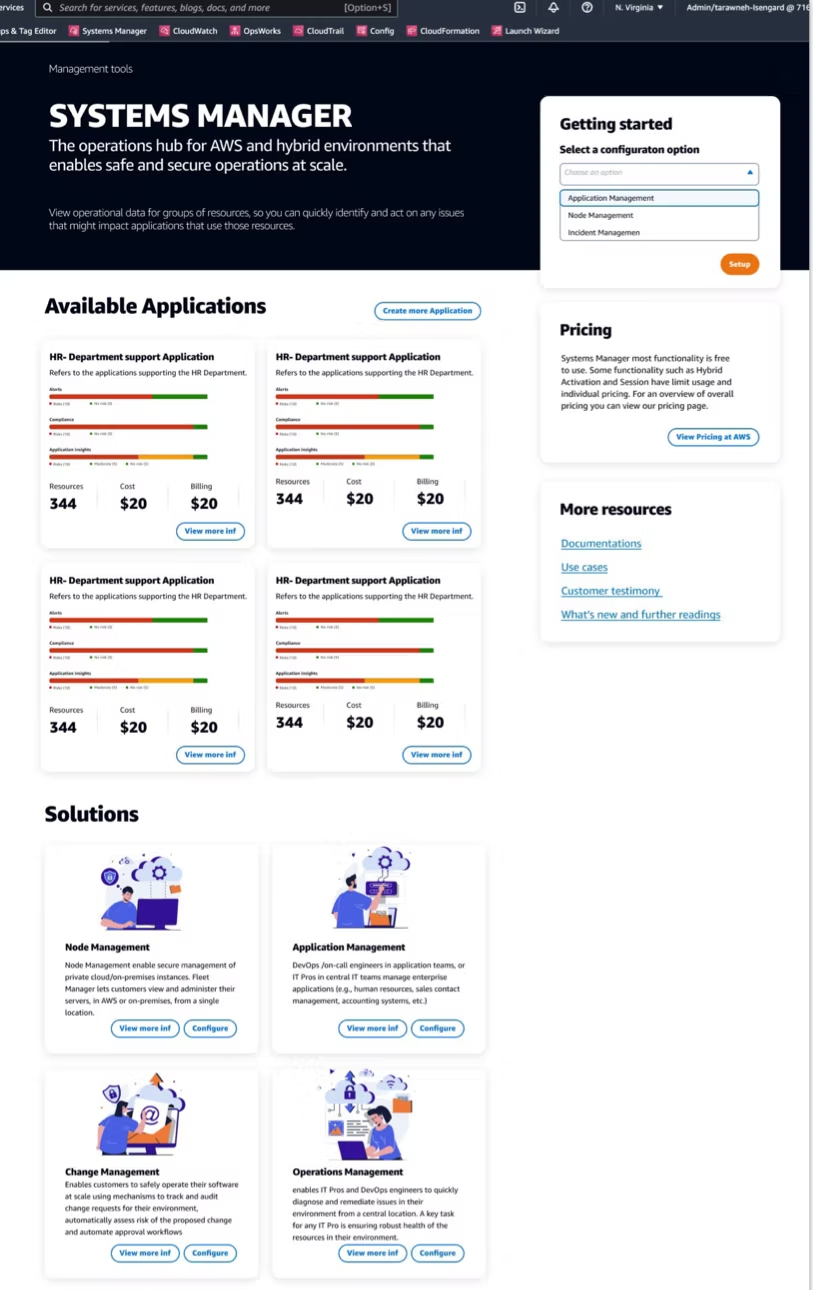
Each service in the portfolio had its own team, roadmap, and model. Together, they covered the full arc of cloud operations, but customers experienced the gaps between them. The work was to connect them around what someone actually needed to do.
Chapter 03
Establishing a direction teams could share
Building the organization alongside the experience
I proposed a consumer-grade experience for AWS: customers should be able to set up and operate their infrastructure without first having to learn how every underlying service worked. I wrote the strategy document and secured management support for a small team to build a proof of concept.
I commissioned external research and spoke directly with customers at re:Invent and the New York Summit. Their frustration with usability, documentation, and setup reinforced the opportunity. Quick Setup would bring recommended configurations and best practices into the product, shortening the path from purchasing AWS services to using them.
The proposal developed into the Systems Manager cockpit strategy: one place to group resources, understand their state, and act. I presented the work to leadership, and Andy Jassy, then CEO of AWS, approved the strategy.

The customer journey became the shared brief across teams with different roadmaps.

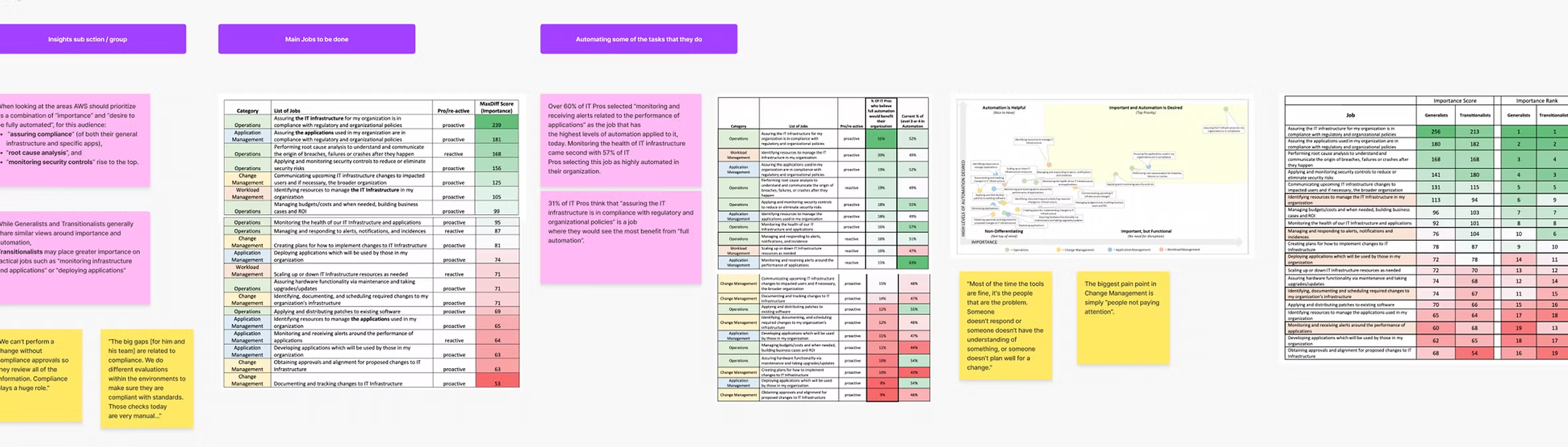
We began by reviewing existing research, identifying gaps, and establishing a baseline for the experience. Interviews, journey mapping, usage analysis, MaxDiff task prioritization, and usability evaluations helped us identify recurring friction and focus our effort.
One disconnect stood out: design teams were focused on the practitioners operating AWS every day. Leadership conversations often centered on the executives choosing and buying it. We mapped roles, responsibilities, and influence inside customer organizations to bring those perspectives together.


The same person could be a developer in the morning and an operator when something broke.
We found that people moved between responsibilities. The same person might write code as a developer, configure infrastructure as an architect, and investigate an incident as an on-call operator. We called these responsibilities "hats." That gave us a more useful way to organize the experience: around what someone needed to accomplish in a particular moment.
A developer spinning up a new environment needs to define resources, configure dependencies, and get infrastructure running quickly. CloudFormation templates and Quick Setup were the primary touchpoints.
An architect setting up an account needed to establish standards, configure compliance rules, and ensure the right guardrails were in place before others started building.
When something broke, an operator needed to understand what happened, which resources were affected, and what action to take — without having to assemble that context from multiple consoles.
During a security review, the same person needed to trace who did what, when, and where — connecting activity records to the configuration state at that point in time.
Chapter 04
Securing commitment across seven product roadmaps
Delivering the connected experience required investment from seven product teams with existing priorities. Individual interface improvements would not be enough. We needed those teams to build the underlying capabilities that made cross-service workflows possible.
I used customer research and the setup-time opportunity to make the case for redirecting resources. Working with my GM and engineering leaders, I influenced the service roadmaps and helped secure a dedicated team focused on the customer experience across product boundaries.
I owned the end-to-end experience and release, with product managers, designers, and design technologists reporting to me. I partnered directly with the engineering manager, prioritized the roadmap, and brought in external research and consultancy support where we needed additional expertise or capacity.
Individual interface improvements would not be enough.
Chapter 05
Systems Manager: a connected operational journey
Set up · Find context · Investigate · Act
We shaped the experience around four activities: set up, find context, investigate, and act. This gave the portfolio a shared direction while allowing teams to contribute through their existing services.
Start with the outcome
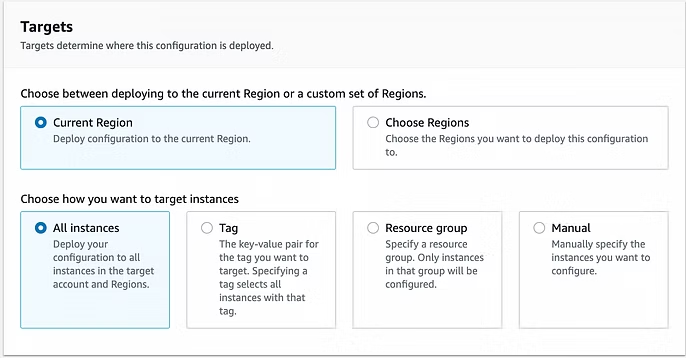
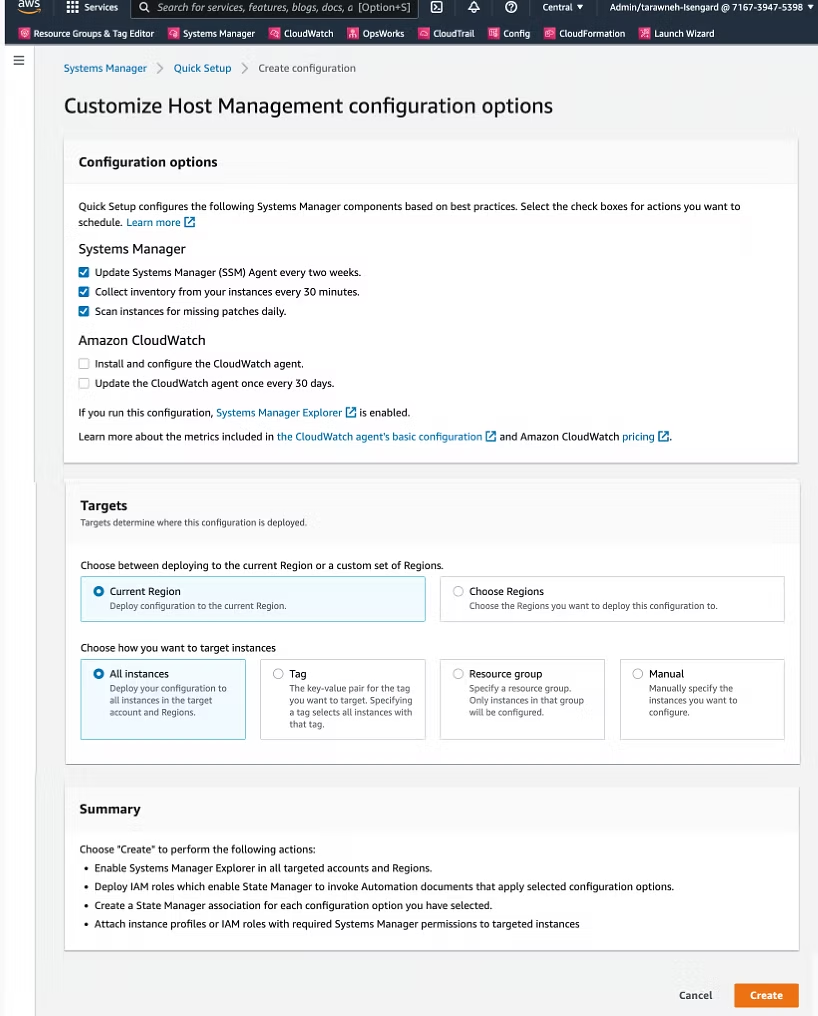
We introduced a library of recommended setups for common use cases. Customers could choose what they wanted to accomplish, understand what a configuration would do, and select where to apply it.
Recommended defaults simplified the common path. Advanced configuration preserved control for customers with more specialized requirements. Underneath, CloudFormation templates helped make the setups repeatable and extensible.
This work included bringing Config into the setup journey — customers could establish configuration recording by choosing coverage, delivery settings, notifications, and target accounts and Regions.
Bring the right resources into view
We developed focused hubs around use cases and responsibilities, bringing related resources and information into a shared context. Resource grouping helped customers work with the infrastructure behind an application or environment.
This approach supported the "hats" insight: the most useful view depended on the responsibility someone was taking on at that moment.


Investigate the issue in one place
An operational problem should not require the customer to assemble an investigation environment first. OpsCenter organized investigation around OpsItems: operational issues with relevant resources and supporting information attached.
Config history, CloudTrail activity, metrics, and alerts helped customers understand what had happened without repeatedly reconstructing the context across consoles. Searchable details, priorities, statuses, related issues, and summary views supported both individual investigations and the broader operational workload.


Connect the evidence to an action
Systems Manager Automation provided reusable runbooks for common operational tasks, and OpsCenter connected those runbooks to the affected resources. Customers could investigate an OpsItem and initiate an appropriate automation from the same context.
The design needed to make the target, action, and execution state understandable — particularly when an operation could affect multiple resources. This connected issue identification, investigation, and remediation into a more coherent flow.


Chapter 06
Managing risk through phased delivery
The connected experience depended on seven product areas with separate roadmaps and competing resource commitments. Pursuing the full vision in one release would have made delivery dependent on all those teams moving together. Leaving each team to deliver independently risked recreating the fragmented experience we were trying to resolve.
I owned the release and worked with product and engineering leaders to deliver incrementally over three years. We started with a small proof of concept, established the shared platform, and expanded the experience as the underlying service capabilities became available.
Milestone 1 — Test the direction before expanding investment
We secured a small team to build a proof of concept. I commissioned customer research and spoke directly with customers at re:Invent and the New York Summit to inform the proposal. This gave leadership a concrete experience to evaluate before committing broader resources to the cockpit strategy.
Milestone 2 — Release the foundation with initial use cases
Our first release combined the shell and platform with use cases including compliance and dashboarding. This established the shared experience while delivering functionality customers could use, without waiting for the entire seven-product vision to be complete.
The risk was choosing the wrong use cases — ones that weren't actually right for the market this early in the approach. We were confident in the direction, but confidence wasn't proof. We outlined every use case we could realistically cover, then tested willingness to pay directly with customers at the summits: we gave each person a fixed budget of 10 euros and asked them to put it toward the features they'd actually fund. Their choices gave us the confidence to move forward.
Milestone 3 — Expand the connected experience
Subsequent releases extended the experience across setup, resource context, insights, and action. I worked across the service roadmaps to prioritize the underlying capabilities these journeys required. Quick Setup incorporated recommended configurations and best practices, reducing the research and manual setup customers needed to do themselves.
Milestone 4 — Extend the platform to other teams
I proposed compositional UI to reduce the frontend and design effort required for integration. Shared capabilities and guidelines gave other teams a way to contribute to the experience. Six AWS teams ultimately integrated their services.
Keeping delivery and quality aligned
Resourcing, cross-team dependencies, and UX quality remained ongoing risks throughout delivery. Product managers, designers, and design technologists reported to me, and I partnered directly with the engineering manager. I prioritized the roadmap and conducted design reviews to assess how each release contributed to the connected customer experience.
Chapter 07
Building the team behind the experience
Organizational work as product work
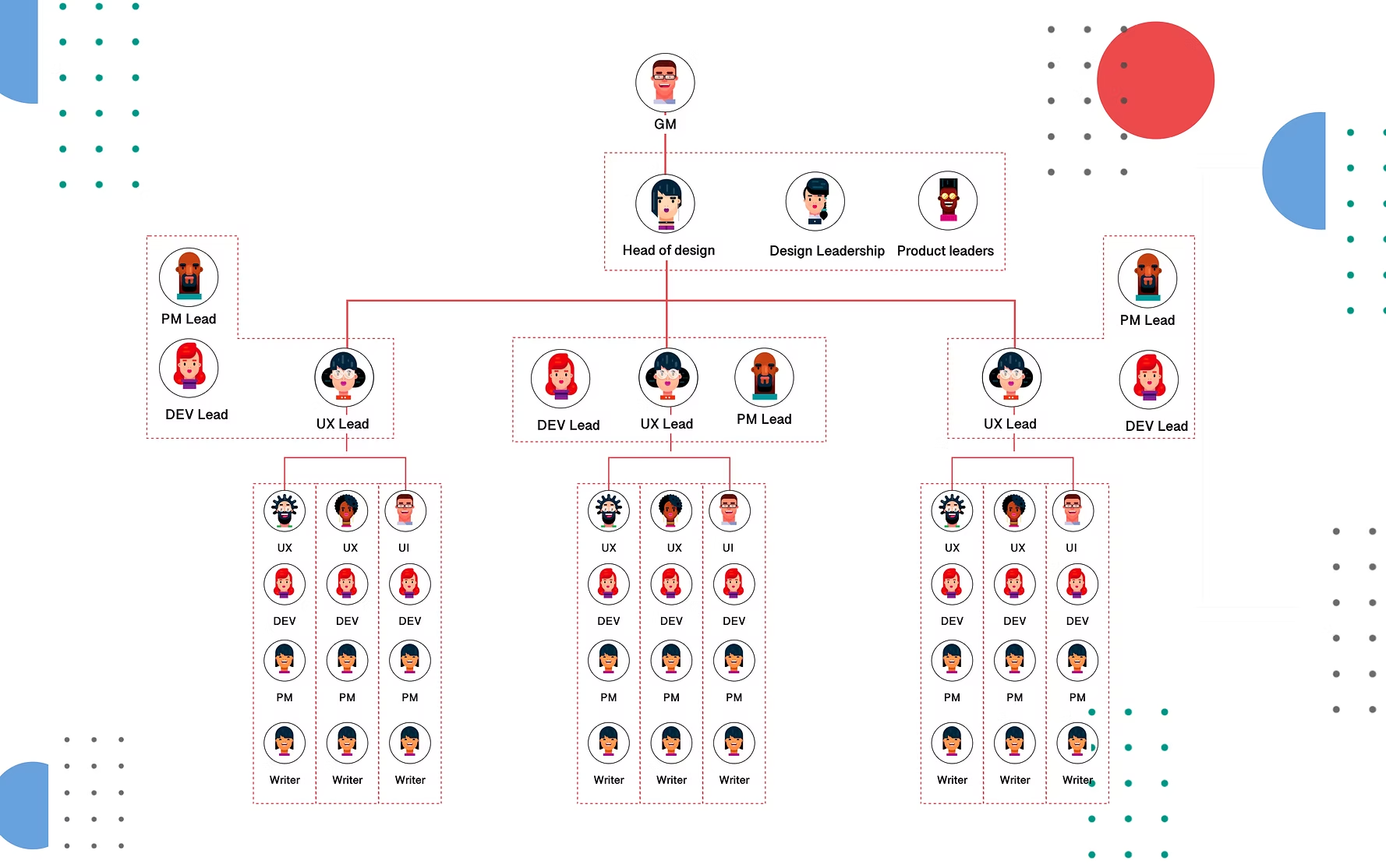
Leadership Responsibilities
- Set the vision and UX strategy for simplifying AWS operations into task-based, modular experiences.
- Defined KPIs linking design outcomes to business metrics such as ARR growth, onboarding efficiency, and reduced support tickets.
- Built and scaled the design organization — hiring designers, researchers, design technologists, and writers.
- Led a tiger team to drive the discovery phase, define personas, map jobs-to-be-done, and deliver the first integrated prototypes.
- Pitched the strategy to executives and GMs, securing buy-in and resources.
The product direction required sustained collaboration across more than 30 teams in nine organizational units. I worked across hiring, resourcing, career development, design processes, and product milestones.
Research gave teams a shared understanding of customer needs. Written strategy supported decisions about direction and investment. Prototypes made cross-service workflows concrete enough to discuss and develop together.
The organizational work and product work reinforced each other: connecting the experience required teams to understand how their decisions affected the wider journey.
Chapter 08
Impact
AWS Management Tools · Measured 2017–2022
Chapter 10
What the work delivered
Three connected outcomes
A connected operational experience
Systems Manager brought setup, resource context, investigation, and automation closer together, with Config and CloudTrail contributing information to the operational journey.
A foundation other teams could extend
The setup library and reusable configurations gave teams a shared way to contribute capabilities while building on existing AWS services.
A new generation of resource management
Resource Groups v2 and Tag Editor v2 extended the work into new product experiences, including the retirement of v1 and customer transitions.
Going through the capabilities and experience of Systems Manager is beyond the purpose of this post, but the people who built it and keep building it are some of the unsung heroes of the company. If you have not followed the evolution of this service, you should pay attentionperilli.com — Amazon Has Won Enterprise IT Management
The work between products deserves as much attention as the work within them.
The work between products is where customers encounter missing context, repeated steps, and conflicting mental models. At AWS, I learned to lead through those boundaries: understand the customer's work, make a shared direction concrete, and build the relationships and team capacity needed to deliver it.